Showing posts with label Tips. Show all posts

How to Fix a website Certificate Warning problem. (100% working & easy)

Tuesday, March 10, 2015


Fix Date and Time
website open problem solv.

 
Step 1

If your computer's clock is set to a date or time that is after the website's certificate expired, you can change your clock settings. Click the date in the bottom right corner of your computer's Desktop.
Step 2

Click "Change date and time settings" to open the Date and Time dialog.

Related Reading: How to Request a Missing Certificate for a Web Server
Step 3

Click "Change date and time..."
Step 4

Enter the correct "Time" and select the correct "Date."
Step 5

Click "OK" on both dialog boxes to change the date and time on your computer.


Like Us for more Tips Facebook.com
Continue Reading | comments (2)

4 ways to make a good girlfriend.

1. Be a good listener. 

The men whom women invariably settle down with all have one thing in common: they make her feel special. If you're failing to inspire this feeling in her, it's probably because you're more focused on your feelings than hers.

Sometimes men are so caught up in impressing their date, they come off as uninterested in the person in front of them. By the time the first date ends, they've rattled off their list of brag-worthy accomplishments, but never took the time to understand what she's about. Take a breather, and let the poor woman speak!

The easiest way to set yourself apart from the self-absorbed schmucks taking her out is to ask her questions and actually listen. She'll feel more connected to you, and you'll actually make it to date number two. It's a win-win situation.


2. Get good at sex.


 We hate to say it, but if your game out of bed is strong, you might need to look toward what's happening between the sheets.

Sex is an important way to connect with a woman. You might have good chemistry with your clothes on, but if you’re missing the mark with them off, it's unlikely she'll want to sign up for a monogamous relationship with you. If she's going to have sex with one person, it better be explosive.

If you've been under the false impression that showing up for sex is enough to satisfy a woman, get your mind right. Put your selfishness in check, and really ask yourself if you focus on her pleasure enough. From her end, the answer is probably no.

3. Be confident.

 It all comes back to the way you feel about yourself. If you think your swag is lacking, it is. Women don't want a man with self-esteem issues who needs to be reassured of his worth; they want a man who is fully aware of what he brings to the table and how desirable it is.

When you linger in singledom against your will, and feel your confidence start to sway, take a step back and reassess the situation. You're a cool guy, and if you're not connecting with someone, it doesn't change how awesome you are. It just means you didn't have chemistry with that particular woman. Shake it off, and move on to the next one!

4. Be ready to commit.

If you've made it to the end of the list and are convinced that none of the above apply to you, it's possible women are interested, and assume you are not. You could be a supremely smooth, very datable dude. But if you're inadvertently signaling you're not interested in commitment, no sane, smart woman will pursue you.

Without even realizing it, men drop subtle hints that indicate their interest and readiness in commitment. But, sometimes miscommunication can happen. Signals get crossed. You think you're playing it nonchalant by not putting too much effort in, and she backs off, assuming you're involved with someone else, or just not looking for the same thing she is.

Sometimes, in an attempt to date defensively, you say you're not looking for a relationship or you're not ready for commitment, when in actuality, you are. Get real with yourself about what it is your seeking, and you won't send the kind of mixed signals that scare her off.
Continue Reading | comments (1)

31 Ideas to coming visitor on Your Website

Tuesday, January 13, 2015

31 Ideas to coming visitor on Your Website


Every website main asset is visitor. Because visitor is show the website. So today we talk to how get drive visitor on your website. Let’s start & see.

1.      Starts a forum on your website – An active forum can quickly begin ranking for long-tail keywords. They’re also great for decreasing your site’s bounce rate, increasing time-on-site, as well as building a community.

2.      Share your blog posts regularly on Facebook  - Post a short excerpt from your posts to entice them to click through.

3.      Start a Facebook group that drives traffic to your site – Start a niche-specific group where members can ask questions and get support (and don’t forget to point them back to your site’s content where relevant).

4.      Get on YouTube – YouTube drives the most engaged traffic out of all social media sites, with an average of 2.99 pages per visit.

5.      Promote your blog posts to your email list – This doesn’t have to be the main focus of all your emails, but including a link or two back to your blog posts can considerably increase traffic, leads, and sales.

6.      Work on your headlines – Your headlines are what will get people in the door, particularly when you share your blog posts via social media; make sure they pique interest and clearly articulate the benefit to your readers. For help with that, see “The Online Marketer’s Guide to Writing High-Converting Headlines.”

7.      Join a blogging community like bditschool  – This is a great way to network with other bloggers, and to cross-promote each other’s content.

8.      Include links to other relevant posts on your blog – When you write a post, always be sure to mention other posts your readers may find helpful; this is great for SEO as well as for increasing time-on-site, conversion rates, and referral traffic.

9.      Guest post on relevant blogs – There’s not much point guest blogging on a site in an unrelated niche; make sure you only contribute to highly-relevant, high-quality sites in your niche. See

10.  Optimize your existing posts – Comb through your old posts to make sure they have unique and relevant title tags, URLS and meta descriptions.

11.  Demote irrelevant Google sitelinks – While Google sitelinks are automatically generated, you can demote URLS you don’t want to show; this may increase the chances that the URLS you do want listed show up. You can do this from within Google Webmaster Tools.

12.  Arrange an advertising swap – Trade banner ads with a complimentary site in your niche.

13.  Submit your posts to Reddit – Yes, this also still works.

14.  Mention influencers in your tweets – When you cite, quote or mention someone in a blog post, be sure to @ mention them in your tweet when you promote your post.

15.  Focus your energy on strategies that are working – You don’t have to do what everyone else is doing. Study your analytics to see your main traffic drivers, and focus on your energy on these areas.

16.  Build connections with others in your niche – I know this sounds cliché, but building personal relationships with other bloggers in your niche will often result in organic inbound links and referral traffic to your site.

17.  Make sure you have every relevant keyword you can think of on your site – I’m not talking old-school keyword spamming here. I’m talking about focusing on topical content; and making sure you at least have the chance of being found for all your relevant keywords, no matter how obscure they may be.

18.  Create a top 10 website post – Select the top 10 blogs in your niche, and write a post about them. You may also want to create a simple badge or banner those sites can embed to show off their award.

19.  Make the most of Facebook links – Be sure to include links back to your site in your About page, in your photo descriptions, in the comments of your posts (where relevant), and in your milestones.

20.  Add text to your blog post images – Try including your post title and URL in your blog post images for optimal effect when pinned or shared.

21.  Become a member of industry Facebook and LinkedIn groups – Offer valuable advice and info to build relationships and drive traffic to your site.


Click here for see next part. 31 Ideas to coming visitor on Your Website


22.  Connect with bloggers who are already sending you traffic – If someone has already linked to your site, they obviously like what you have to say. Contact them to see if there are other ways they could help promote your content (and vice versa).

23.  Ask a well-known blogger to guest post on your site – They’ll likely share the post with their audience, driving traffic to your site.

24.  Respond to blog comments – Respond thoughtfully to all comments on your blog. This is great for building relationships, as well as for driving commenters back to your site.

25.  Add your blog to Alltop – As an aggregate for all kinds of web content, submitting your blog increases your chances of getting found by people looking for content in your niche.

26.  Answer Questions – Visit sites like Yahoo Answers or Quora and answer questions relevant to your niche.

27.  Write a Response Post – Respond to a controversial post in your niche and then let the original poster know about it. Chances are good they won’t be able to resist responding to it on their blog.

28.  Contact influential bloggers – When you write a groundbreaking or newsworthy post, notify influencers in your field. You may be surprised at how many link back to your post.

29.  Make proper use of categories – If you haven’t already organized your content into relevant categories, now’s the time. Categories are great not only for SEO, but for helping your readers find relevant content.

30.  Write landmark posts  - Create at least a few long-form, authoritative posts that will organically garner links and attention over the long haul.

31.  Comment on industry blogs  - Become a regular commenter on a popular blog in your niche to help drive referral traffic and to establish relationships with other bloggers.

Your can Like us on Facebook or twitter or link
Continue Reading | comments (4)

5 Killer way to optimize your blog post & get more visitor.

5 Killer way to optimize your blog post & get more visitor.


I think so you know what is blog, so now you need more and more visitor in your blog. Am I right? I think you have any blog. Now this tutorial we see how to optimize your Blog Post so that you get more visitor. Now see how to optimize your Blog post on SEO (search engine optimize) friendly 


The truth is, many bloggers fail to take advantage of the enormous marketing potential of their blogs. In fact, a recent study by blogger shows that although roughly 60% of businesses have blogs, 65% of those blog owners haven’t even updated in the past year! Here are six easy search engine optimization (SEO) tips to help get visitor.
1.    research easy keyword.
Keyword is a short word or hade name for a article. Keyword research is essential for on page optimization. Chances are you are naturally including keywords without realizing it simply by providing valuable content on a topic. However, there are a variety of tools and techniques for finding related keywords relevant to your blog post that you may not have considered.

2.    Utilize keywords throughout your post. Once you have targeted a couple of valuable, relevant keywords, it is important to place them where they will have the most impact for humans and search engine crawlers indexing your content. Try to include them in the following places:
o    Title
o    Headings and subheadings
o    Introductory sentence
o    Concluding paragraph
o    Anchor text. ( Link other page)
o    Title tags and meta descriptions
A word of caution: Don’t engage in keyword stuffing, which is the act of filling your content with so many keywords that it becomes difficult to read. Not only will this irritate your blog followers, but also get you penalized by Google. A couple of strategically placed keywords will do the trick.
3.    Optimize your images. Whenever you upload a photo to your blog, be sure to include keywords in the file name and fill out the alternate text field with a brief, keyword rich description of the photo.

4.    Reference others with links. When you mention another blogger or article in your blog post, include a link to the information you are referencing. Not only is it good blogging etiquette, but you may also get lucky and receive a link back. Quality links are a valuable commodity for any site looking to rank higher in search engine results pages.
5.    Use social media to broaden the reach of your blog posts. As a small business, you may be utilizing Facebook, Twitter, Google+, or other social media sites to create connections with potential and current customers. Why not promote your blog content on these sites for even more web exposure? Free programs like facebook, google plus  make it easy to post links to your latest blog post on all of your social media sites with just a couple of clicks. You can even schedule your posts ahead of time!
Say Bditschool, when you  following these simple (search engine optimize) SEO tips, you get high visitor. Wish you happy bloging.
Continue Reading | comments (3)

99 Keyboard shortcuts for windows. part-2

99 Keyboard shortcuts for windows. part-2

99 Keyboard shortcuts for windows. part-1
• Shift+F10 (Display the shortcut menu for the selected item)
• Alt+Spacebar (Display the System menu for the active window)
• CTRL+ESC (Display the Start menu)
• Alt+Underlined letter in a menu name (Display the corresponding menu)

• Underlined letter in a command name on an open menu (Perform the corresponding command)
• F10 key (Activate the menu bar in the active program)
• RIGHT ARROW (Open the next menu to the right, or open a submenu)
• LEFT ARROW (Open the next menu to the left, or close a submenu)
• F5 key (Update the active window)
• Backspace (View the folder one level up in My Computer or Windows Explorer)
• ESC (Cancel the current task)
• Shift when you insert a CD-ROM into the CD-ROM drive (Prevent the CD-ROM from automatically playing)
Dialog Box Keyboard Shortcuts
• CTRL+Tab (Move forward through the tabs)
• CTRL+Shift+Tab (Move backward through the tabs)
• Tab (Move forward through the options)
• Shift+Tab (Move backward through the options)
• Alt+Underlined letter (Perform the corresponding command or select the corresponding option)
• Enter (Perform the command for the active option or button)
• Spacebar (Select or clear the check box if the active option is a check box)
• Arrow keys (Select a button if the active option is a group of option buttons)
• F1 key (Display Help)
• F4 key (Display the items in the active list)
• Backspace (Open a folder one level up if a folder is selected in the Save As or Open dialog box)
Microsoft Natural Keyboard Shortcuts
• Win (Display or hide the Start menu)
• Win+BREAK (Display the System Properties dialog box)
• Win+D (Display the desktop)
• Win+M (Minimize all of the windows)
• Win+Shift+M (Restore the minimized windows)
• Win+E (Open My Computer)
• Win+F (Search for a file or a folder)
• CTRL+Win+F (Search for computers)
• Win+F1 (Display Windows Help)
• Win+ L (Lock the keyboard)
• Win+R (Open the Run dialog box)
• Win+U (Open Utility Manager)
Accessibility Keyboard Shortcuts
• Right Shift for eight seconds (Switch FilterKeys either on or off)
• Left Alt+left Shift+PRINT SCREEN (Switch High Contrast either on or off)
• Left Alt+left Shift+NUM LOCK (Switch the MouseKeys either on or off)
• Shift five times (Switch the StickyKeys either on or off)
• NUM LOCK for five seconds (Switch the ToggleKeys either on or off)

Dear Visitor gives your Comment so that we make batter.

Continue Reading | comments (2)

99 Keyboard shortcuts for windows.

99 Keyboard shortcuts for windows.

Hay, friends some time we need finish our computer work quickly and smartly. Some time we see other people get there work easily by keyboard shortcuts. Now here your find 99  easy shortcuts whit what shortcuts what work. So let’s start-

• F3 key (Search for a file or a folder)
• F2 key (Rename the selected item)
• CTRL+F4 (Close the active console window. When a console has only one console window, this shortcut closes the console)
• CTRL+C (Copy)
• CTRL+X (Cut)
• CTRL+V (Paste)
• CTRL+Z (Undo)
• Delete (Delete)
• Shift+Delete (Delete the selected item permanently without placing the item in the Recycle Bin)
• CTRL while dragging an item (Copy the selected item)
• CTRL+Shift while dragging an item (Create a shortcut to the selected item)
• CTRL+RIGHT ARROW (Move the insertion point to the beginning of the next word)
• CTRL+LEFT ARROW (Move the insertion point to the beginning of the previous word)
• CTRL+DOWN ARROW (Move the insertion point to the beginning of the next paragraph)
• CTRL+UP ARROW (Move the insertion point to the beginning of the previous paragraph)
• CTRL+Shift with any of the arrow keys (Highlight a block of text)
• Shift with any of the arrow keys (Select more than one item in a window or on the desktop, or select text in a document)
• CTRL+A (Select all)
• Alt+Enter (View the properties for the selected item)
• Alt+F4 (Close the active item, or quit the active program)
• Alt+Enter (Display the properties of the selected object)
• Alt+Spacebar (Open the shortcut menu for the active window)
• CTRL+F4 (Close the active document in programs that enable you to have multiple documents open simultaneously)
• Alt+Tab (Switch between the open items)
• Alt+ESC (Cycle through items in the order that they had been opened)
• F6 key (Cycle through the screen elements in a window or on the desktop)
• F4 key (Display the Address bar list in My Computer or Windows Explorer)

Click for more -99 Keyboard shortcuts for windows. part-2

Dear Visitor gives your Comment so that we make batter.

Continue Reading | comments (3)

Two very important for safe your google adsense account.

Sunday, September 21, 2014

Two very important for safe your google adsense account.

1. Google adsense codes: 
You create AdSense ads spot for your blog or website. Do not change anything or any codes, just insert their code into your website or blog. If you change your code, your account will not safe. Never break their policy by changing codes. 
 

sedense code, ad code

2. Illegal sites: 
Illegal sites mean a bad site like porn, sex, 18+ site & etc. After you got a approve AdSense account. Don’t create illegal site or don’t put your Google AdSense codes in those sites. If you do this, your account will ban within a day or some hour. So make sure you put their AdSense code in legal sites.
 

That’s it. If you follow this steps, hope your Google AdSense account will be safe forever. 

This is a massage to you: Thanks a lot for spend you time to reading this post. If you need any help about Google AdSense, don’t hesitate to ask me on comment below. For more update Like our page, google+.
Continue Reading | comments

What you do or how to safe your approve Google AdSense account. Very important & update.

Saturday, September 20, 2014

What you do or how to safe your approve Google AdSense account. Very important & update.

I hope so now you already know about Google AdSense. It’s one of the best publisher site for blogs or website. Al most every web or blogger site developer & peoples using Googel Adsense for make their career and earn big Money from internet. But recently it’s too hard for getting an approval Google AdSense account. If you failed to approve your Google AdSense account, then I will recommend you to read this post. Great ways to approve Google AdSense account. Now see I created this post for give you some ways how to safe your Google AdSense accounts? This post you can advanced learn what you need to do after get a approve Google AdSense account. Now start:-
 
Way of  AdSense account safe:

Now your see what do or what you don’t do after get your AdSense account. Your must need to follow some steps for safe your AdSense account. If you don’t follow this rules or break some rules or steps. You probably see your account banned.


1. Don’t spam anytime:

When some people got an AdSense account for their blog. They are start spamming via blog commenting, Facebook group shares and many more. And when the AdSense account got banned they are asking what’s wrong they did? Spamming is really harmful way to get visitors and easy way to ban your AdSense account.


2. Try to updating daily:

Try to publish 1 content daily, because content is king. Google loves valuable content. Try to create content for your readers, not for Google. Make sure your content helpful and useful for your visitors. 


3. Don’t Fake clicks:

Google is master of master thinking and programming. So don’t say your friends, cousins, brothers or others to visit your blog and click the AdSense ads. Because they easily catch fake clicks with eyes. So you must need to avoid this if you want to keep your AdSense account safe. 


4. Avoid black hat SEO:


SEO is a best way to get visitor but black hat is always harmful for blogs or website AdSense account. It will ban your blog or website forever and Google AdSense is nothing, you will get ban your account too. So you must need to avoid this black hat SEO technique for our blog or website.


5. Don’t Publisher ID share with other:

Pls Don’t share your Google AdSense publisher ID to your friends/ brother or anyone.  This is high danger for your AdSense account. So make sure about this step. 

Also don’t share your AdSense code to others. If they put your code in illegal site and do fake clicks. You will lose your account soon. 
Continue Reading | comments

What is antivirus? Name of Antivirus.

Tuesday, September 16, 2014

What is antivirus?

Antivirus is a good code for computer or laptop on the other hand Virus is a bad code for computer or laptop. Which software safe our account, computer, laptop, mobile & ect we call that is antivirus

From wikipedia: Antivirus or anti-virus software  is computer software used to prevent, detect and remove malicious software.

Antivirus software was originally developed to detect and remove computer viruses, hence the name. However, with the proliferation of other kinds of malware, antivirus software started to provide protection from other computer threats. In particular, modern antivirus software can protect from: malicious Browser Helper Objects, browser hijackers, ransomware, keyloggers, backdoors, rootkits, trojan horses, worms, malicious LSPs, dialers, fraudtools, adware and spyware. Some products also include protection from other computer threats, such as infected and malicious URLs, spam, scam and phishing attacks, online identity (privacy), online banking attacks, social engineering techniques, Advanced Persistent Threat , botnets, DDoS attacks.

Some Name of Antivirus:
1. Kaspersky Anti-Virus
2. Norton Antivirus/ Internet Security

3. avast!
4. Avira
5. AVG Anti-Virus
6. BitDefender
7. BullGuard 


So think you get your ans from Bditschool dot com i hope you like our Computer education facebook like page 
Continue Reading | comments (8)

What is password?

What is password?

Password is a key of enter an access any security system or controls room. 
I find from Wikipedia: A password is a word or string of characters used for user authentication to prove identity or access approval to gain access to a resource (example: an access code is a type of password), which should be kept secret from those not allowed access.

Example a strong password: 55484%@$Ksmp ( here all type of word, symbol, count so it’s a strong password)
So I think you find your ans about password. Like us on facebook


Why we need pass-word?
1.    Enter any system
2.    Enter our won security system
3.    Control our account
4.    Protect our money, information, data & many more. 
Continue Reading | comments

What is secure or what is security?

What is secure or what is security?

About secure/security: security is a protection from any harmful system like that hacking, fishing, crime overall all kind of harmful that your protection or your safety is called secure.


from Wikipedia:Security is the degree of resistance to, or protection from, harm. It applies to any vulnerable and valuable asset, such as a person, dwelling, community, nation, or organization.

Why we need secure/security?

 
1.    For protection our system.
2.    For safe our data system.
3.    For safe our Business customer.
4.    For safe our Online Bank account
Get safe. And all type of Protection so we need security.


So think you get your ans from Bditschool if you like this pls like us on facebook.


Continue Reading | comments

Best 2 type exercises for weight loss in 15 day & looking hot.

Wednesday, August 20, 2014

Best 2 type exercises for weight loss in 15 day.
Every man & women have a common problem name is high weight. But if you try to loss in your weight then see this two type exercises for loss your weight in 15 days.

 
1. JUMPING JACK

For start any exercises we need to warm up first ,jumping jack is the best exercise for warm up because it increase heart rate , increase blood flow to muscles throughout the body and decrease the risk of muscle tear or body spasm,Jumping jack target different muscles of the body like Gluteus muscle ,calf muscles ,Achilles tendon all muscles together perform Jumping jack.By doing jumping jack you can burn 300 calories in 20 minute.
loss weight, easy loss weight, looling hot

2. BURPEES

This is an advance aerobic exercise it is used for muscle strength training or  also helps in fat burn.This exercise are mostly used in sports person or military persons,There is large number of muscles are used in burpees ,examples pectoralis major or chest muscle ,triceps muscle,abdominal muscles ,gluteus muscles, quadriceps or hamstring muscle.It will also increase blood pressure or heart rate when we performing this exercises .you can burn 500 calories in only 10 minute of burpees exercises.

loss weight, easily loss weight, weight loss

If your like  & love this tutorial Pls like us facebook here
our other Tutorials:
1. 5 important subject to safe computer or laptop on the internet.
2. 99 top uk job website list.
3. Open a gmail account step by step with photo shot.
Continue Reading | comments

Easy & Advanced SEO. Part-1

Saturday, August 16, 2014

What is SEO or About SEO ?

SEO is a big online marketion way. The full maining is SEO S=Search E=Engine O=Optimisation. Easyly i want to say you seo si a good or any search engine 1st page to contorl show your compuny name and on Search engine 1st page.
Search Engine Optimization is the process of improving the visibility of a website on organic natural or un-paid search engine result pages SERPs, by incorporating search engine friendly elements into a website. 


what is seo, why seo, seo, easy seo
A successful search engine optimization campaign will have, as part of the improvements, carefully select, relevant, keywords which the on-page optimization will be designed to make prominent for search engine algorithms. Search engine optimization is broken down into two basic areas: on-page, and off-page optimization. On-page optimization refers to website elements which comprise a web page, such as HTML code, textual content, and images. Off-page optimization refers, predominantly, to backlinks (links pointing to the site which is being optimized, from other relevant websites)

Did you want to know about more?

Search Engine Optimization from Google.
Continue Reading | comments

Do you know how to open a Facebook account? See how by photo shots.

Saturday, August 9, 2014

Everyone know about facebook but some time we have a question from our friend or anybody. The question is how to open a facebook account ? Am I right ? Yes, so I make a easy tutorial to make a facebook account by photo shots. Now see how you make a facebook account:
You need a e-mail account for make a facebook account. If you not have don't worry, see here how to open a e-mail account
Working 1 : First Go to Facebook.com for sign up.
Fill the  form and Click on "sign up" button.(See the screen-shot bellow)
easy tutorial, tutorial, facebook, opne facebook
Details of this box:
First Name: Enter Your First Name.
Last Name: Enter Your last name.
Your Email: Enter your E-mail Address(Conformation code/link send to this e-mail).
Re-enter Email: Enter your Email Again
New Password: Enter a new password for Your Facebook account.(To make your password  use numbers, letters, symbols, etc. (like: kk552%%) .And Make sure that your password is easier remember  for future logins.)
I-am-Select you’re grander from the box.
Birthday-Enter your birthday (You can hide your birthday from your friends by changing fb settings).
Then click on  "Sign Up" button.

easy tutorial, tutorial, facebook, opne facebook

working 2: After that you can see the  Next step. In this step you can  add your friends from other networks. 
easy tutorial, tutorial, facebook, opne facebook
Working 3: Click on that,  "Skip this" ( on the under) 
easy tutorial, tutorial, facebook, opne facebook
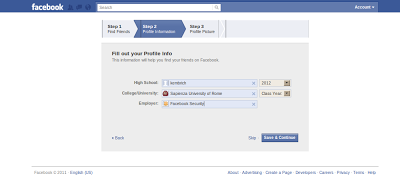
Working 4: Click the Skip this Or you can give you school Name, college name, passing year. If you give this then you click Save and continue baton.
easy tutorial, tutorial, facebook, opne facebook
Working 5: Click to Upload a photo (Then you give your photo) or Click to Skip 


Good News your Account is complete  99%. Check your E-mail and click on the link that can conform your new facebook account. ( N:B: see how to open a e-mail account? )


IF you think it is a necessary easy & important computer tutorial for all. Pls Like us on Facebook here
Continue Reading | comments

5 important subject to safe computer or laptop on the internet.

Tuesday, August 5, 2014

5 important subject to safe computer or laptop on the Internet.
Now a days computer is a pert of our life . Everyone love his computer like a life. But someone don’t know how to safe his computer or laptop.
Today I post 5 important subject to safe her/his computer or laptop on the Internet?
Subject 1. Firewall:
safe computer, safe laptop, safe internet.

A firewall is a piece of software or hardware that sits between your computer and the network and only allows certain types of data to cross. For example, a firewall may allow checking email and browsing the web, but disallow things like Windows file sharing.
If you’re connected to the internet through a router, then you already have a type of hardware firewall that prevents random networking-based external threats from reaching your computers.
If you’re using a dial-up internet connection, a firewall may not be as important, although it doesn’t hurt to have one. A software firewall may be your only option.
Subject 2. Computer Scan for viruses
safe computer, safe internet, safe useing

A virus is a computer program written by someone presumably with the intent of spreading and causing grief.
Sometimes, typically via email or other means, viruses are able to cross the firewall and end up on your computer anyway.
A virus scanner will locate and remove them from your hard disk. A real-time virus scanner will notice them as they arrive, even before they hit the disk, but at the cost of slowing down your machine a little, and occasionally even interfering with other operations.
Important: Because new viruses are arriving every day, it is critical to keep your virus definitions up-to-date. Be sure to enable the scanning software’s automatic-update feature and have it do so every day.
Subject 3. Scan for spyware

Spyware is similar to viruses in that they arrive unexpected and unannounced and proceed to do something undesired. Spyware can be relatively benign from a pure safety perspective, as it might “only” spy on you. But that’s enough. It can violate your privacy by tracking the websites that you visit, add “features” to your system that you didn’t ask for, or record your keystrokes and steal your account login information for any online services that you might use.
Some of the worst offenders are spyware that hijack normal functions for themselves. For example, some like to redirect your web searches to other sites to try and sell you something. Of course, some spyware is so poorly written that it might as well be a virus, given how unstable it can make your system. The good news is that, like virus scanners, there are spyware scanners that will locate and remove the offending software.
Subject 4. Don’t forget the physical
safe on the internet

An old computer adage is that “if it’s not physically secure, it’s not secure.”
All of the precautions that I’ve listed above are pointless if other people can get at your computer. A thief can easily get at all of the unencrypted data on your computer if they can physically get to it. Even login passwords can be trivially bypassed if someone has access to your computer.
The common scenario is a laptop being lost or stolen during travel, but I’ve also received many reports of people who’ve been burned because a family member, friend, significant-other, or roommate accessed their computer without their knowledge.

( N.B. If you think this is a important subject for all normal user pls Like Us on facebook or twitter.)


Continue Reading | comments

world big programming learning website list.

Monday, August 4, 2014

world big programming learning website list.

Computer programming is a best education on the world. It’s really a hear education and best education. Now today I help you for a better programming learning by website list. The World most Programming learning website list for a better programmer.
programming, learning, c, c+, c#, html, php, computer programming


Online CoursesProgramming Books (Free)
JavaScriptCode AcademyLearn StreetKhan AcademyCode CombatCode AvengersEloquent JavaScriptJavaScript Guide,Speaking JavaScriptJS The Right WayOh My JS
HTML & CSSCode AcademyDon’t Fear The Internet,TutsplusLearn LayoutA to Z CSSDash,Web AccessibilityThe Hello WorldMozillaDive into HTML520 Things I LearnedHTML DogHTML & CSSHTML5 for DesignersDOM Enlightenment
jQueryCode AcademyTutsplusCode SchooljQuery FundamentalsLearn jQuery
PythonCode AcademyGoogleLearn Street,Python TutorIHeartPYPython for You and Me,  Dive into Python,Learn Python the Hard WayThink Python,Python for FunTango with DjangoDjango
Ruby & Ruby on RailsCode AcademyTryRubyCode Learn,RailscastsRubymonkLearn StreetWhy’s (Poignant) Guide to RubyLearn Ruby the Hard WayLearn to ProgramLearn Rails by Example
PHPCode AcademyPHP ProgrammingPractical PHP
Google Apps ScriptGetting StartedOffice HoursGoogle Scripts ExamplesLearning Apps Script
WordPressTreehouseWordPress TV
Linux & Shell ScriptingStanford.eduExplain ShellConquer the Command Line
Node.jsNodetutsNode SchoolThe Node Beginner BookMixu’s Node bookNode Up and RunningMastering Node.js
Git (version control)Code SchoolGit ImmersionGitHub TrainingPro GitLearn Git
Objective-C (iOS & Mac)Code SchoolStanfordiTunesU
Chrome Dev ToolsCode SchoolDev Tools SecretChrome Dev Tools TutorialUdacity
Go LanguageGolang.orgGopherCastsProgramming in GoGo by Example,Learning Go
JavaLearn JavaCoding BatProgramming in JavaO’Reilly Learning Java,Think JavaJava & CSJava for Python Devs
Android App DevelopmentUdacity (Google Developers), CourseraThe New BostonGoogle UniversityApp Development EssentialsCode Learn
D3 (data visualization)Data Visualization for the WebDashing D3D3 Tips & Tricks
Everything ElseUdacityedX.orgCourseraUdemyLyndaPluralsightTreehouseOpen ConsortiumOne Month Rails
Continue Reading | comments (4)

Open a gmail account step by step with photo shot.

Sunday, August 3, 2014

Open a gmail account step by step with photo shot.

Today we learn how to open a gmail or google account for mail or any thing. We know that Google mail another name is gmail. Gmail is a web-based email account in which emails are stored on the internet rather than on your computer. Internet email can be a flexible option as you can access emails from any computer that has internet access – for example, at internet cafés – anywhere in the world.
In this guide, we’re going to show you how to get started with email by creating an account in Gmail.

So lets start now…

Step 1: Open up your browser and go this url: http://www.gmail.com. (this is google or gmail opening url)
Step 2: You see a From come out. you Fill up this from Like this pic...
Step 3: Click on next button. when your finish full up this from.
  You almost done. wait a few scened your mail is ready for use. 

Now you can use your account. 
Thanks to read this. If you like this free tutorial Pls like us on Facebook  or  Twitter
Continue Reading | comments

99 top uk job website list.

Friday, August 1, 2014

world top 99 UK Job Websites list Find your job from here. see 99 top class job site and info.

1. Gumtree Free Classifieds in United Kingdom - Cars, property, jobs, flatshare and more - Buy and sell on Gumtree!

2. iJobs Search for your next job from 2,536 live vacancies, or upload your CV now and let employers find you

3. Guardianjobs Find your perfect job on Guardian Jobs. Apply for jobs in the public sector, education jobs, media jobs, graduate jobs and government jobs available today.

4. Jobrapido In one quick job search find all jobs and vacancies posted on careers sites in the UK.

5. Splashfind One of the UK's fastest growing job searching websites. List of the Top 100 UK websites. No registration required

6. Universal Jobmatch Directgov jobs and skills search -

7. jobsite Online searches for U.K. and European jobs with notification by email. Includes CV posting and career advice.

8. Gov.uk Find a job with Universal Jobmatch - GOV.UK

9. Indeed Job Search by Indeed. one search. all uk jobs. Search millions of jobs from thousands of job boards, newspapers, classifieds and company websites on indeed.co.uk

10. Telegraph Jobs Find a job with Telegraph Jobs. Use our job search to find employment and job opportunities and get notifications by email or RSS. Updated daily.

11. Reed Personnel Services Daily updates of job vacancies, career guides, articles, research reports, a salary calculator, cv tips, and more.

12. totaljobs.com Start your job search on totaljobs, the UK's largest job site. With thousands of new vacancies added daily, you're sure to find a job that's right for you.

13. CV-Library Search and apply to thousands of vacancies online when you register your CV with CV-Library.

14. Monster Online recruitment centre for job seekers and employers alike; leading U.K. companies advertise current vacancies; apply online.

15. Craigslist craigslist provides local classifieds and forums for jobs, housing, for sale, personals, services, local community, and events

16. Gigajob Find job vacancies for you at Gigajob UK. Your one stop job portal for getting jobs in United Kingdom and also post jobs ad for Free.

17. Vivastreet.co.uk Jobs . Search the latest job adverts in your local area with Vivastreet.co.uk - Simple, local and free.

18. Trovit Search hundreds of thousands of job opportunities right across the UK. Looking for a job? Trovit!

19. NHS Jobs Welcome to NHS Jobs, with a job search, information on applying for jobs in the NHS and a Jobs by Email service.
job website, job, job site list

20. Prospects Offers career advice and information for graduates. Comprehensive resource for graduate courses, recruitment, and more.
21 Designweek The UK's best source of jobs for designers, artworkers, copywriters and all of those in the design & creative industry.
22 Adzuna We search thousands of job sites so that you don't have to. Discover job vacancies in your local area and across the UK now!
23 Jobisjob Search thousands of jobs from major job boards in one place with JobisJob.co.uk. Find all the UK Jobs including jobs in London, Cardiff, Edinburgh, Birmingham, Manchester, Leeds and more vacancies across the UK. Jobs in England, England Jobs.
24 SimplyHired Search all UK jobs using Simply Hired, a job search engine. Find jobs from a variety of employment and recruitment sites across the web.
25 Career Builder Search for your next job on CareerBuilder.co.uk. Send CVs to recruitment agencies and employers, prepare for interviews, or apply to jobs across the UK.


26 Mandy.com Find a job in Film TV Production : broadcast television employment listings
27 CWJobs.co.uk Advertise IT Jobs with CWJobs.co.uk, the leading specialist IT recruitment website. We attract over 430,000 IT jobseekers each month and provide cost effective solutions to meet your IT recruitment needs.
28 Fish 4 jobs UK's best jobs site | Work wanted, apply for jobs online | New vacancies daily, recruitment agents | Job adverts, finding staff in London and UK
29 Caterer.com Search for local hospitality jobs on Caterer.com, the UKs largest hospitality recruitment website. Thousands of hotel, chef, restaurant, pub and bar jobs are added daily so you're sure to find a job that's near you.
30 Technojobs IT Jobs advertised online. Thousands of new IT Jobs, Telecoms jobs and technical jobs. Technojobs is the leading UK IT Jobs and technical recruitment website, online since 1999.
31 e4s.co.uk Most visited UK student jobs website helping students find part time jobs, temporary job vacancies, internships; graduate jobs during Christmas; Summer
job site, uk job website, 99 job website

32 CharityJOB Over 1,000 charity jobs, hundreds of fundraising jobs and all kinds of third sector jobs.
33 UK Staff Search Search over 40,000 UK jobs with the UK largest FREE job board. Jobseekers, earn money with your CV today!
34 Music-jobs Music job listings and online community for music professionals and employers in the UK.
35 Jobs Go Public Browse public sector jobs online from top UK public sector employers on Jobsgopublic.com. Search the largest selection of public sector jobs by industry, occupational group, job title, salary or location.
36 JustEngineers Search for a wide range of Engineering Jobs in the UK and Worldwide including mechanical, structural, civil, electrical, gas, oil and more.
37 VacancyCentral.co.uk Vacancy Central is the overlay job board of more than 60 industry specific job boards.
38 Personnel Today Search for your next job from 1,309 live vacancies, or upload your CV now and let employers find you
39 CityJobs.com Search the latest jobs in London. Find your next job on CityJobs.
40 Leisure Jobs Job board for leisure jobs in London, across the UK, Europe and worldwide including fitness, sport, catering, hospitality, travel and tourism, spa and beauty.
41 Careworx Careworx Care Jobs and Nurse Jobs at Careworx.co.uk. Search 1000s of vacancies and find work today
42 Strike-Jobs.co.uk jobs, careers, vacancies and recruitment on strike-jobs.co.uk. Search jobs & vacancies by salary, sector, location and find your next career and job. Provides career advice, courses, CV help and more
43 Adecco better work, better life.
44 ipa.co.uk Search for jobs in the advertising industry with the leading agencies
45 TotallyLegal Search the latest legal jobs; law vacancies from top firms and employers, including solicitors, lawyers, in-house, private practice and trainee legal jobs. Upload your CV; apply now
46 Career and Jobs UK UK job search and recruitment from the UK’s premium job site. Careers and Jobs UK list vacancies from the top recruitment agencies and employers.
47 madjobs Search & apply online for the latest jobs in marketing, advertising & design from across the UK & Ireland and worldwide
48 AlltheTopBananas Admin Jobs. Search and find thousands of admin jobs, updated daily, from the UK's Job Search Engine. Find the latest UK based admin jobs from all over the web. Register and we will email you new Admin jobs daily.
49 Go Job Search UK Start your online job search today with Go Job Search UK. We hold 1000's of jobs from both direct employers and recruitment agencies.
50 ComputerWeekly.com Find IT jobs on ComputerWeekly.com. Use our computer job vacancy search to find the latest jobs in IT.
51 Careers4a.com Careers4a.com for your job and career development search for jobs on careers4a.com
52 Incatering Search and apply for catering jobs and hospitality vacancies on InCatering. Upload your CV today and get found by catering and hospitality recruiters.
53 Agency Central Quickly find the most suitable Recruitment Agencies or find your perfect job
54 Professional Passport Jobs Find your next job, contract or assignment through the Professional Passport Network. Thousands of jobs from recruitment companies and direct employers covering many sectors including Teaching, IT, Banking, Oil and Gas and Healthcare to name a few.
55 xpatjobs Jobs in UK - Search 1,220,392 jobs from 88,418 agents and employers - All the English and foreign language job offers on one website. Jobs in UK. Jobs in UK. Thousands of jobs Abroad. We specialise in English UK jobs and other multilingual UK jobs. Expat jobs.
56 FEjobs.com FEjobs is the dedicated job board for vacancies in Further Education. Developed in association with the AoC by Eteach.com FEjobs.com posts new vacancies daily from Colleges across the UK .
57 Jobs 4 Medical Search online for Medical jobs, Nursing jobs, Pharmacist and Pharmacy jobs today! We also have job vacancies for Doctors, Dentists, Social / Care workers and other medical professionals.
58 pickingjobs Picking Jobs is where students and backpackers can find interesting vacation employment abroad and where employers recruit willing workers from around the world: summer jobs, fruit picking, grape harvesting, seasonal work, resort jobs, winter jobs, and gap year jobs.
59 Brook Street Brook Street - one of the UK's leading recruitment specialists - Number one for office and light industrial positions on both a temporary and permanent basis
60 British Jobs British Jobs, Jobs in Britain, Jobs, Britain, British career, British work, British vacancy, British opportunity, British job board ,British employment agency, British employers, British company, British temp, British temporary, British contract
61 Senior Sales Jobs Search for jobs at Senior Sales Jobs now and send your CV straight to the top recruitment agencies and employers in sales. Start your job search now and find your next sales job here.
62 UK Job Guide Find a UK Job. Looking for a new job or a career guide? Let UK Jobs Guide tell you what you need to work in the UK, we have a great range of job guides full of good advice to help you into employment via a recruitment agency or job centre
63 hairandbeautyjobs.com Hairandbeautyjobs. All the latest vacancies from leading employers and careers advice. The leading job board for hair stylist and beautyjobs for the UK and overseas. Innovative and exciting hairandbeautyjobs matches you to jobs automatically and enables employers to find you!
64 Best Admin Jobs Admin Jobs - Search The Best Admin Jobs, PA And Office Jobs In The UK From All The Top Recruitment Agencies. Jobseekers, Start Browsing Today And Find The Best Admin Job For You.
65 Retail Careers Leading retail recruitment website UK
66 London Jobs Search and apply for the very latest Jobs in London with London's largest job search website. We list over 20,000 London Jobs from over 1000 London employers.
67 Just Jobs 4 Students The latest jobs and vacancies from top UK recruitment agencies and employers. Upload your CV and apply now.
68 Natives Ski Jobs - Search 1000s of Ski jobs including Ski Jobs, Ski Season Jobs, Ski Season, Seasonal Jobs from the UKs leading Ski recruiters and companies.
69 joodis.net Jobs - Job Search - UK jobs - Search for UK and International Vacancies
70 Search London Jobs Search United States Jobs, Search American Jobs, Search Australian Jobs, Search London Jobs, Search Canada Jobs, Search European Jobs, Search Jobs in Australia, Search Jobs in Canada, Search Jobs in Europe, Search United Kingdom Jobs, Sales Jobs in London
71 Experis Experis, the world leader in professional recruitment & consulting. Search a range of permanent or contract IT jobs, Finance jobs or Engineering jobs
72 Job Centre Vacancies Beat the Job Centre queues by searching here now. Start at the Job Centre Online and find vacancies from jobcentre plus in England, Scotland and Wales.
73 OnlyMediaJobs The Number 1 Source of Media jobs including advertising, broadcast, social media and digital media jobs vacancies in UK covering areas like London, Bristol, Birmingham, Scotland, Manchester, Liverpool, etc
74 Academics academicsltd.co.uk has hundreds of new job vacancies in Primary Teaching, Secondary Teaching and Primary, Secondary & Teaching Assistants jobs | Academics
75 SimplyHRJobs.com All the latest human resources jobs updated constantly on SimplyHRJobs.co.uk
76 oZZle.co.uk Find your new job quicker. The largest selection of Printing Jobs and Packaging Jobs from Top Recruitment Agencies and Employers.
77 Access Science Jobs 844 Science Jobs available on Access-ScienceJobs.co.uk. Find vacancies now and apply online
78 Hair 2 Beauty Jobsource Hairdressing and Beauty jobs in the UK and Worldwide. Featuring spa, beauty therapist, hair stylist and salon jobs for beauty recruitment.
79 Jobs in Winter Award winning and innovative, Crystal is the UK's number 1 for ski holidays.
80 gapwork.com Gap year information with news on volunteering and working abroad as well as advice on planning a gap year from your one-stop gap year backpacking website
81 OnlineJobhunt Start your job search on OnlineJobHunt.com, search for thousands of jobs across the UK. Jobs in Birmingham, Jobs in Manchester, Jobs in Liverpool, Jobs in London
82 LegalProspects.com Search for the latest legal jobs including lawyer jobs, solicitor jobs, paralegal jobs, legal secretary jobs and other law jobs from top legal recruiters.
83 ClickAjob ClickAJob is The UK's Largest Job Search Engine. Find current job vacancies in your area. We provide a one-stop job centre and online recruitment agency for your next career move.
84 Career Opportunities Choose from over 400 career training courses. Flexible training. Recognised qualifications.
85 Creative Jobs Central Creative Jobs Central offers thousands of quality job listings in popular industries including fashion jobs, photography jobs, event planning jobs and much more
86 Topjobs Topjobs You can search for thousands of jobs in UK with our powerful search engine.
87 BestITjobs IT & Telecoms Jobs. A Great And Easier Way To Search Through Hundreds Of IT & Telecoms Jobs Across The UK.
88 Workthing Workthing offers the tools you need for career development, career management & job vacancies from top UK recruiters for jobseeking success
89 BritishJobsonthe.net Search through thousands of British jobs at britishjobsonthe.net including Glasgow, Dundee and Edinburgh
90 Career Legal Career Legal is celebrating its 21st successive year in recruiting for the legal community across London and throughout the UK.
91 jobs1.co.uk Jobs search and recruitment resource for the UK - A comprehensive hub site of employment, career training, jobs and work related content.
92 Summer Jobs 4 Students The latest jobs vacancies from top UK recruitment agencies employers. Upload your CV & apply now.
93 Seasonal-Jobs.com Seasonal-Jobs.com - the seasonal recruitment website to use for seasonal jobs in the travel, tourism, beauty, & spa, fitness, health & leisure, sports, retail, catering and hospitality industries in the UK and worldwide
94 Job Max Search here for Food Jobs, FMCG and Manufacturing Careers, Food Service, Catering and Hospitality jobs Register for jobs by email and let the best jobs come to you!
95 South East Local Jobs Search local jobs in The South East, careers in The South East, and work in The South East with your very own South East Jobs Board. The latest local jobs from top employers and South East recruitment agencies.
96 SalesVacancies.com Search thousands of job listings from numerous companies. Find local job opportunities, post your resume and get hired. New jobs added daily so check back regularly.
97 Career-Seekers Uk's premier Job search engine. Easily Find the UK based Job that you have been looking for. Thousands of new listings. Full and part time vacancies.
98 Dental Angels Dental Angels is a specialist dental recruitment agency in the UK, helping dental candidates find professional jobs in dentistry.
99 Egerton Stephens Partners Recruitment specialists based in Kent and London.

Continue Reading | comments (3)

My website Roll No

Subscriptions Now

Enter your email address:

Click Subscribe Batton for more

Like For Compuer Education

Nydta.com. Powered by Blogger.

For Bangladeshi Time

 
Support : Copyright © 2011. Necessary easy & important computer Tutorial for all. - All Rights Reserved
Template Modify by Creating Website Inspired Buy any Product
Proudly powered by Blogger