

Saturday, August 9, 2014
Everyone know about facebook but some time we have a question from our friend or anybody. The question is how to open a facebook account ? Am I right ? Yes, so I make a easy tutorial to make a facebook account by photo shots. Now see how you make a facebook account:
You need a e-mail account for make a facebook account. If you not have don't worry, see here how to open a e-mail account
Working 1 : First Go to Facebook.com for sign up.
Fill the form and Click on "sign up" button.(See the screen-shot bellow)
 Details of this box:
First Name: Enter Your First Name.
Last Name: Enter Your last name.
Your Email: Enter your E-mail Address(Conformation code/link send to this e-mail).
Re-enter Email: Enter your Email Again
New Password: Enter a new password for Your Facebook account.(To make your password use numbers, letters, symbols, etc. (like: kk552%%) .And Make sure that your password is easier remember for future logins.)
I-am-Select you’re grander from the box.
Birthday-Enter your birthday (You can hide your birthday from your friends by changing fb settings).
Then click on "Sign Up" button.

working 2: After that you can see the Next step. In this step you can add your friends from other networks.
 Working 3: Click on that, "Skip this" ( on the under)
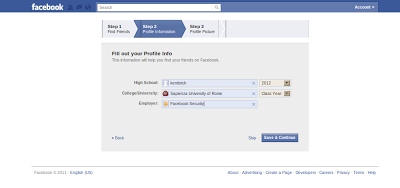 Working 4: Click the Skip this Or you can give you school Name, college name, passing year. If you give this then you click Save and continue baton.
 Working 5: Click to Upload a photo (Then you give your photo) or Click to Skip
Good News your Account is complete 99%. Check your E-mail and click on the link that can conform your new facebook account. ( N:B: see how to open a e-mail account? )
IF you think it is a necessary easy & important computer tutorial for all. Pls Like us on Facebook here
You need a e-mail account for make a facebook account. If you not have don't worry, see here how to open a e-mail account
Working 1 : First Go to Facebook.com for sign up.
Fill the form and Click on "sign up" button.(See the screen-shot bellow)
First Name: Enter Your First Name.
Last Name: Enter Your last name.
Your Email: Enter your E-mail Address(Conformation code/link send to this e-mail).
Re-enter Email: Enter your Email Again
New Password: Enter a new password for Your Facebook account.(To make your password use numbers, letters, symbols, etc. (like: kk552%%) .And Make sure that your password is easier remember for future logins.)
I-am-Select you’re grander from the box.
Birthday-Enter your birthday (You can hide your birthday from your friends by changing fb settings).
Then click on "Sign Up" button.
Good News your Account is complete 99%. Check your E-mail and click on the link that can conform your new facebook account. ( N:B: see how to open a e-mail account? )
IF you think it is a necessary easy & important computer tutorial for all. Pls Like us on Facebook here


